Whisper's Public Website
Technical details for the current website
Section titled “Technical details for the current website”Web Server
Section titled “Web Server”Whisper uses a shared web server provided by JustHost. The account is on the Plus plan and it comes with “unlimited” web space.
| Apache | 2.4.59 | |
| PHP | 8.2 | |
| MySQL | 5.7.44-48 | This is a very old version and is preventing us from upgrading to Joomla 5, which requires at least MySQL 8.0.13. Other web platforms have been quite slow to upgrade to MySQL 8, for example Siteground is targeting June 2025. |
| Perl | 5.16.3 |
Like many other low-cost shared web servers, it can’t be used to run applications based on Java or Tomcat (they require a lot of memory).
FTP access
Section titled “FTP access”For secure FTP from Windows we like WinSCP. The connection to JustHost’s server can be patchy. The settings for WinSCP are: 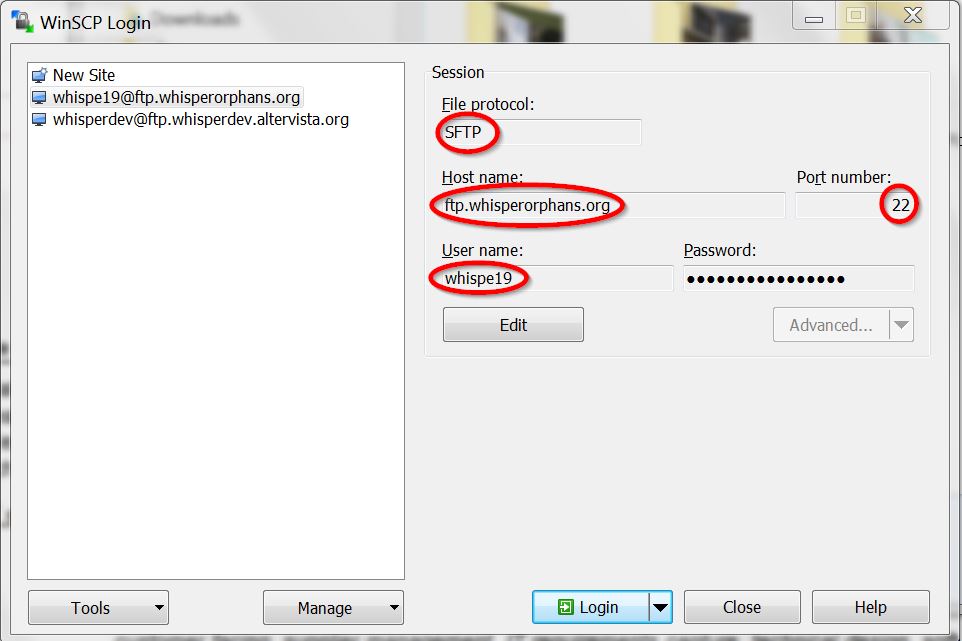
Cloudflare
Section titled “Cloudflare”Whisper uses Cloudflare as a Content Delivery Network (CDN), currently through a paid plan although their free plan would probably be adequate. As currently configured, HTML is not cached but other assets are. By default the Cloudflare servers use a 2-hour cache.
Shell (SSH) access
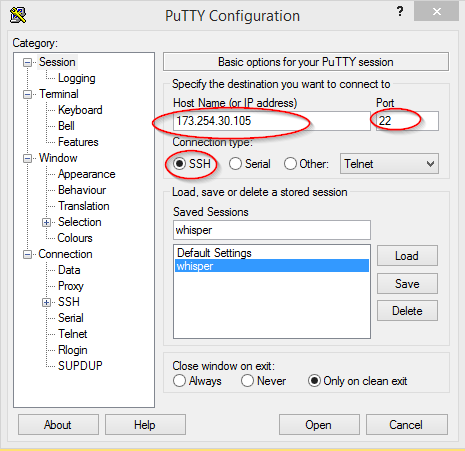
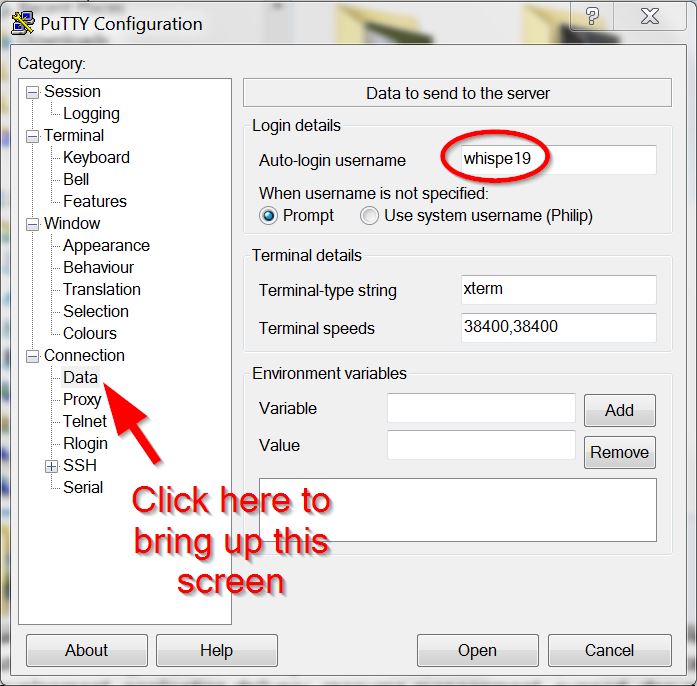
Section titled “Shell (SSH) access”Shell access is available using Whisper’s account name whispe19 and Whisper’s static IP address 173.254.30.105 as the hostname; whisperhealth.org can’t be used as the hostname for shell access, because of the Cloudflare CDN.
Below are the settings for the popular PuTTY SSH client. You can save the settings for future use from PuTTY’s front screen; in the screenshot below the settings have been saved as “whisperhealth”.
Test environment
Section titled “Test environment”https://test.whisperhealth.org is our test environment. It can be copied from the production website in 10-15 minutes as follows:
- Log onto the web server via SSH, for example using PuTTY
- Run the script ~/public_html/rsync_test_site.sh to copy the files to the test environment
- From your PC, log on to the JustHost website https://justhost.com
- Go to Advanced > Databases > phpMyAdmin
- export database whispe19_whispj4 to a file on your PC
- in database whispe19_test, scroll down to the bottom of the table list, select all tables and drop them
- import the tables into whispe19_test from the file on your PC
The filesystem for the test environment is in ~public_html/test. The following files in ~/public_html are customised for the test environment and are copied into place by the rsync_test_site.sh script:
| Customised file | Destination file in ~public_html/test |
| .htaccess.test | .htaccess |
| configuration.test.php | configuration.php |
| php.test.ini | php.ini |
| robots.test.ini | robots.ini |
For convenience when testing, the test website is not cached by Cloudflare.